


Coolpad has managed to launch few good smartphones in entry-level budget group including devices such as Coolpad Note 3 Lite and Mega 2.5D (Read Review) is the last budget smartphone from company that we reviewed sometime back. The company has launched an upgrade over that as Coolpad Mega 3 and one feature that distinguishes it from any other smartphone is the Triple SIM support. Yup, you read that right as it comes with support for three SIMs. Mega 3 is priced at just Rs. 6,999.
This review is based on our experience with Coolpad Mega 3 (White color variant) as our primary device for one week.
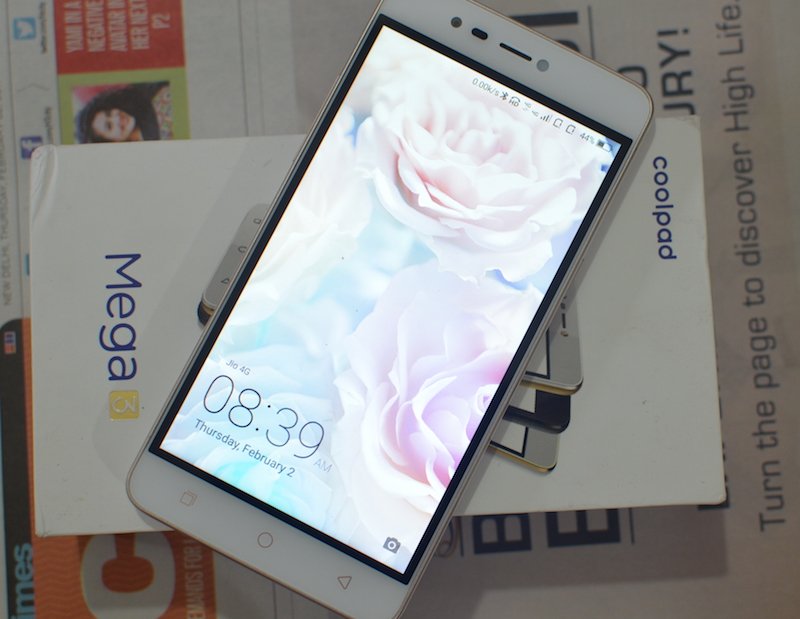
Coolpad Mega 3 specifications
- Display : 5.5-inch 720p HD display
- CPU: 1.25 GHz Quad-core MediaTek MT6737 processor with Mali-T720 GPU
- RAM : 2 GB RAM
- Storage: 16 GB , expandable up to 64 GB via microSD
- OS: Android 6.0 (Marshmallow) OS with CoolUI 8.0
- Misc: Triple SIM,
- Camera : 8 MP autofocus rear camera with LED Flash, f/2.2 aperture + 8 MP front shooter with LED flash, f/2.2 aperture
- Dimensions: 154.4 x 76.8 x 8.35 mm
- Weight: 170.5 gm
- Connectivity : 4G VoLTE, WiFi 802.11 b/g/n, Bluetooth 4.0, GPS, USB OTG
- Battery : 3050 mAh
Design and Build Quality
In terms of design and build quality, Coolpad Mega 3 looks almost similar to the earlier Coolpad Note 3 Lite with plastic cover at back, yet it gives a decent look. The back panel is removable and you can put your SIM cards (three slots) and Microsd card (Dedicated slot) only after removing the back cover. The phone does feels bit heavy at 170 grams in spite of just 3050 mAh of battery. The back panel is a bit textured and it gives you a good hold of the device without getting slipped. The volume rocker buttons are at one side while the power button is on other.
The 8 MP main rear camera is placed at the top middle along with LED flash with Coolpad branding along with speakers at bottom while the 3.5 mm audio jack is at the top & micro USB port is at the bottom.
[flickr_set id=”72157678096711132″]
It comes with physical capacitive buttons for navigation.
Display
It sports a 5.5 inch 720p HD Display with resolution of 1280 x 720 pixels. It appears decent in most conditions and its brightness adapts itself well if the surroundings changes using the adaptive brightness feature. Obviously it’s not good if you are using it in direct sunlight, yet It comes with great viewing angles. It is just a decent display for an entry-level smartphone. The touch response is just average yet you won’t feel any issue in day-to-day use.
Performance, Gaming and Benchmarks
Under the hood, Coolpad Mega 3 is powered by 1.25 GHz Quad-core MediaTek MT6737 processor with Mali-T720 GPU with 2 GB of RAM.MediaTek MT6737 is just an entry-level SOC chip. Presence of 2 GB of RAM gives it a decent performance for average day-to-day performance including some casual gaming, but obviously it can’t perform well if you start playing graphics intensive games such as Asphalt 8 or do multitasking on it. So if you are even a moderate gamer, then this device is not for you.
Coolpad Mega 2.5D comes with 16 GB internal storage with support for expandable storage via microSD cards. The operating system and preloaded apps take around 5 GB of storage and hence the end-user gets only about 10.10 GB of internal storage. It also supports USB OTG letting you use an external USB storage to add more capacity to the device on the go.
The call quality during voice calls was pretty clear without any issues. The dialer app comes with ability to record calls without installing any additional app or rooting the device. There were no issues even with VOLTE calls using the JIO network.
The Antutu benchmark score for Coolpad Mega 3 came out to be about 29,000+ points which is decent enough for devices priced under Rs. 7,000.
Camera
The phone comes with 8 MP autofocus main rear camera with LED Flash, f/2.2 aperture and another 8 MP front shooter with LED flash, f/2.2 aperture for selfies . The camera app is good and comes with loads of options including a PRO mode. We tested the camera under different lighting conditions. The main rear camera did fare better than what we had expected from an entry-level smartphone and produced some decent good shots with good details under normal lighting conditions . But noise creeps in the moment the lighting conditions go dark or artificial or bit low. Landscape shots though fared just average with almost no details and poor exposure.
The PRO mode was available for both the front and main rear camera which is a good addition. The camera app comes with loads of modes such as Face beauty, HDR, Night modes etc. The beauty mode comes with much more options to beautify your images.
The front 8 MP camera is decent enough to produce some good selfies. There is a beauty mode too which works great if you are interested in modifying your selfies.
Camera samples
Checkout the images below taken under different light conditions and different modes. Click on the images to enlarge to original full size image. Full resolution images on can be found on Flickr.
[flickr_set id=”72157678449501331″]
Battery
Coolpad Mega 3 comes with 3050 mAh non removable battery, but the battery life performance did impress us and was better than average with three SIMs with an always ON 4G data connection along with VOLTE and other two SIMs on 2G network.The battery lasted for more than a day with moderate use, but if you are one of aggressive user (including a hotspot user for the data connection like me) then you need to charge it before the day ends. For an average user, the battery will last for about 1.5 days easily.
Operating System and UI
Coolpad Mega 3 runs on Android 6.0 (Marshmallow) with Coolpad Cool UI 8.0. The experience remain same as what we have reported with Coolpad Mega 2.5D such as preloaded bloatware including a default Xploree keyboard (running adware showing you offers from different sites), some bloat placed in the form of widgets and even a Coolpad app store. We switched to Google keyboard / Swiftkey for better experience and recommend the same. The OS looks more like iOS than Android. The notifications toggles are placed at the bottom of the screen instead of top and some of you may find it odd to use them. It comes with a launcher without an App drawer and for users like us, installing a different launcher with app drawer is recommended.
[flickr_set id=”72157680268154195″]
The CoolUI though comes with loads of customisation options including themes and gesture support. Inspite of having three SIMs, the UI works great and its easy to configure them & even switch them.
Conclusion
Coolpad Mega 3 is a great smartphone if your primary need is triple SIM support as it is one of the few phones to offer that feature. It did perform well with decent performance including the camera and comes with good battery life. But you may miss the fingerprint sensor that you can find in Coolpad Note 3 Lite which also comes with a fingerprint sensor but with a compact 5 inch display.


