AndroidPure
  • Leaks
  • News
  • Reviews
  • Updates
  • How to
No Result
View All Result
  • Leaks
  • News
  • Reviews
  • Updates
  • How to
  • Leaks
  • News
  • Reviews
  • Updates
  • How to
No Result
View All Result
AndroidPure
No Result
View All Result

Apple Watch Showing the Wrong Time After DST? Apple Lists Two Fixes

Androidpure Staff by Androidpure Staff
November 1, 2026
in Guide, Wearables

Apple has published a support document confirming that an Apple Watch can show the time an hour off after a daylight saving time change. The fix takes seconds: switch to another watch face and back, or restart the watch. Clocks went back across most of the US today, November 1, so American owners may spot it this morning.

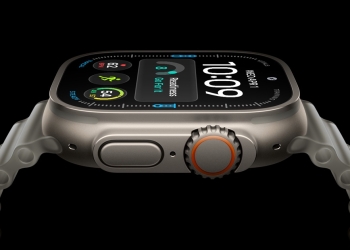
Apple Watch Series 12 in dark bronze showing the time and Heart Rate app on its display
Image: Apple

The document is dated October 30. It follows our earlier report on owners in Europe running into the same glitch. When we covered it on October 26, Apple had not commented publicly. Its support page now describes the symptom and gives two fixes.

What Apple says is going wrong

According to Apple, the wrong hour appears only on the Always On display while your wrist is down. Tap the screen or raise your wrist, and the watch switches to the correct time. Apple also says features such as alarms are not affected.

That makes it mostly a display problem. Still, a quick look at a lowered wrist is exactly how many people check the time. An hour’s error there could leave you thinking you are running late, or that you have time to spare.

How to check whether your Apple Watch has the bug

Glance at the watch with your wrist lowered, then raise it or tap the screen. If the hour jumps when the display wakes up, you are seeing this bug. The time shown on the fully active screen is the correct one.

How to fix the wrong time on your Apple Watch

Apple lists two quick fixes. Either one should bring the Always On display back to the right hour:

  1. Change your watch face: Switch to any other watch face, then switch back to the one you normally use.
  2. Restart the watch: Turn your Apple Watch off and on again.

You can also leave it alone. Apple’s support document says the problem goes away on its own:

If you do nothing, the issue will resolve itself at midnight following the time change.

When the wrong time should clear by itself

The timing depends on where you live. In most of the US, clocks went back early on November 1. If you skip the fixes, the Always On display should correct itself at midnight tonight.

The UK and much of Europe changed their clocks on Sunday, October 25. Owners there should already be past that midnight point. If your watch still shows the wrong hour on Always On, the watch-face switch or a restart is the next step. Time changes can trip up phones too, as we noted in our look at Canada’s time zone change and Android phones.

Which Apple Watch models are affected?

Apple’s support document doesn’t say which Apple Watch models or watchOS versions are affected. The first reports came from owners on the MacRumors forums running watchOS 27 in the UK and central Europe. Some of those users also said it showed up in standby mode. Apple’s document does not mention watchOS 27 or standby mode.

The page ends with a general reminder to keep your Apple Watch updated. It does not say that a software update fixes this particular bug. For now, owners get workarounds rather than a patch. Apple’s document doesn’t say whether a permanent fix is planned.

Source: Apple Support, MacRumors forums, via MacRumors

Related Posts

OnePlus Buds Pro 4 charging case in Polar White, closed, with a OnePlus USB-C cable plugged in
News

OnePlus Buds Pro 4 Specs Are Out, but Price and Launch Date Aren’t

October 31, 2026
Apple Watch Ultra 4 with a titanium case showing the time, heart rate and activity on its display
Deals

Apple Watch Ultra 4 Is Back to $699.99 at Amazon, $99 Below List

October 31, 2026
Google Pixel Watch 5 with a black analogue watch face and woven band, Pixel Watch battery drain bug
News

Google Confirms Pixel Watch Battery Drain Bug, Says a Fix Is Coming

October 31, 2026
Nothing Phone (4a) Pro in pink, silver and black from the back, Nothing OS 5.0 update
Guide

Nothing OS 5.0 Stable Reaches Phone (3a), 3a Pro, 4a and 4a Pro

October 31, 2026
Samsung logo for the Galaxy M36 and F36 One UI 9 update in India
Guide

Galaxy M36 and F36 Start Getting Stable One UI 9 in India

October 29, 2026
Apple logo for iOS 27.2 selfie age verification
Guide

iOS 27.2 Lets You Prove Your Age With a Selfie in Four Countries

October 29, 2026

Follow Us

  • 914 Followers
No Result
View All Result

Popular

  • One UI 9 on a Samsung Galaxy phone, the Android 17-based update adding a home screen search bar

    One UI 9 Puts a Google Search Bar on the Galaxy Home Screen by Default

    Share
    Share Tweet
  • A Copycat WhatsApp Listing on Google Play Has Passed 500K Downloads

    Share
    Share Tweet
  • iPhone XS and XR Finally Get the Exploited Flaw Fix in iOS 18.7.11

    Share
    Share Tweet
  • Pixel Missed-Call Bug Isn’t Fully Fixed, and Pixel 11 Owners Report It

    Share
    Share Tweet
  • Poco X8s Launches Globally at $399 as a Compact 6.35-Inch Phone

    Share
    Share Tweet
  • OnePlus 13R, 13, 13s and 15R Get ColorOS 17 in India Ahead of Schedule

    Share
    Share Tweet
  • Free Fire India Launches on Android and iOS Four Years After the Ban

    Share
    Share Tweet

Recent Posts

  • Apple Watch Showing the Wrong Time After DST? Apple Lists Two Fixes
  • New iPad mini Has a Slightly Smaller Battery and a C Repair Score
  • OnePlus Buds Pro 4 Specs Are Out, but Price and Launch Date Aren’t
  • WhatsApp Group Status: Post a Status Only One Group Can See
  • Lava Phones Will Cost Up to ₹3,000 More From November 15
  • Jio Voice-Only Plans Start at ₹147, but 28-Day Pack Saves Just ₹12
  • Apple Intelligence Coming to China in iOS 27.3: Which iPhones Get It
AndroidPure

Navigate Site

  • Privacy
  • About Us
  • Tip Us
  • Contact Us

Follow Us

No Result
View All Result
  • Leaks
  • News
  • Reviews
  • Updates
  • How to

This website uses cookies. By continuing to use this website you are giving consent to cookies being used. Visit our Privacy and Cookie Policy.