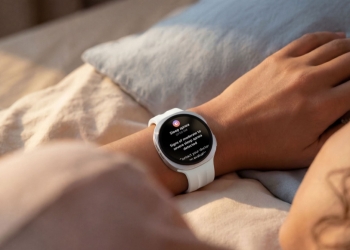
Apple Watch’s two conversation-listening features, Live Rewind and Siri Recap, are now in testers’ hands for the first time. MacRumors and Six Colors report that both arrived in the first watchOS 27.3 developer beta on November 3. The catch is hardware. You need an Apple Watch Series 12 or Ultra 4 paired with an iPhone 16 or newer.

Which devices get Live Rewind and Siri Recap
Apple announced both features in September as part of its Audio Intelligence package. Its support page sets a narrow bar. The watch must be a Series 12 or Ultra 4, paired with one of these iPhones:
- iPhone 16 series: iPhone 16, 16 Plus, 16 Pro and 16 Pro Max
- iPhone 17 series: iPhone 17, 17e, 17 Pro and 17 Pro Max
- iPhone Air
- iPhone 18 series: iPhone 18 Pro, 18 Pro Max and Duo
The iPhone 16e is not on the list, and neither is any iPhone older than the 16 series. Both features also need Apple Intelligence and Siri AI (Beta). They work in English only for now, with more languages promised later.
EU owners will wait longer. Apple says Siri AI, which these features require, won’t initially be available in the EU on watchOS. Users under 13 are excluded. Under-18 Child Accounts need a parent or guardian to switch the features on.
What Live Rewind does
Double-press the Digital Crown and Live Rewind shows a text snippet of the last 15 seconds of speech. You can ask Siri about it or save it to the Siri app. Apple says it doesn’t keep transcribing in the background. Unsaved snippets disappear about 30 seconds after the display dims.
To turn it on, open the Watch app on your iPhone and go to Siri > Live Rewind. Then pick Double Click Digital Crown. Processing happens on the watch and the iPhone. Asking Siri about a snippet or saving it sends it to Apple’s Private Cloud Compute.
What Siri Recap does
Siri Recap takes notes on your conversations in the background and turns them into Apple Intelligence summaries. You can schedule it by time or location, or toggle it manually and from Control Center. Summaries delete themselves after seven days unless you save them. They live in a Recaps tab in the Siri app.
The iPhone first condenses the transcript. Private Cloud Compute then writes the summary. Recap doesn’t identify who said what. Apple itself warns that both summaries and snippets may be incomplete or inaccurate.
The people around you
These features listen to everyone nearby, not just the person wearing the watch. When Apple announced them, recording-consent laws in all-party-consent US states became the obvious question. Apple’s answer is that no audio is stored. Its support page puts it this way:
There is no recording to share, forward, or produce if requested by any party, because no recording exists.
That is Apple’s description of its own design, not something androidpure has verified. Bystanders do get some warning. Activating Live Rewind plays a chime, even on silent or with headphones connected. A full-screen animation and a microphone indicator also appear. Siri Recap tries to leave out sensitive details such as financial data and government IDs. Apple admits its automated filter may not catch everything.
The redesigned Health app is back in the iOS 27.3 beta
Apple’s redesigned Health app also returns in the iOS 27.3 developer beta, after it was left out of the iOS 27.2 release candidate. Apple says it will reach everyone as a free update later this year. Language support now covers:
- Global English
- Chinese (Simplified and Traditional)
- French
- Japanese
- Korean
- Norwegian
- Portuguese
- Spanish
- Turkish
- Vietnamese

The app needs an iPhone or iPad that supports Apple Intelligence, and some features are iPhone-only. Health Age requires an Apple Watch. The VO2 max test needs an Apple Watch, AirPods Pro 3 or a third-party heart rate sensor. Some features are limited to users 18 and over.
When watchOS 27.3 will ship
This is a developer beta only. 9to5Mac says public betas aren’t available yet. Apple has said only that the Health app arrives later this year. MacRumors expects watchOS 27.3 in December, alongside iOS 27.3. Any watch other than the Series 12 or Ultra 4, or an iPhone outside the list above, won’t get these two features.
Source: Apple Support, Apple Newsroom, MacRumors, Six Colors, 9to5Mac
This post was written with AI assistance from public sources and published under the editorial responsibility of AndroidPure’s editor. How we work.