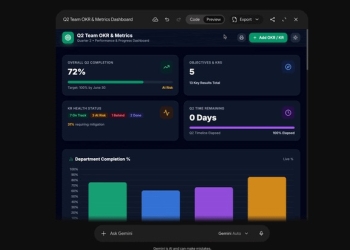
Gemini Notebook is now a Connected App inside the Gemini app, and Google has switched it on by default for most users. The exception is the European Economic Area, where it starts switched off. Gemini can also call on it by itself when it judges a prompt to be relevant. If you don’t want that, you can turn it off in Settings > Connected Apps.
How Gemini Notebook works inside the Gemini app
You can bring it into any chat by typing @Gemini Notebook. From there, Gemini can manage your Gemini Notebook content without you leaving the conversation.
- Notebooks: create, edit or delete them, and list the ones you have.
- Sources: add, update or delete sources, and list what each notebook contains.
- Answers: respond to questions using a notebook’s context.
One of Google’s examples has the user asking Gemini to save a copy of the current chat into a notebook for a Bio 101 course. In practice, a whole conversation can be filed away with one line.

On by default, except in Europe’s EEA
Google’s announcement spells out the regional split plainly:
This feature will be ON by default for users globally, except in the European Economic Area, where it will be OFF by default.
Google also says Gemini can detect on its own when to use the Notebook app for a relevant prompt. You don’t have to tag it for it to act.
That combination deserves a second look. Outside the EEA, most users now have a tool that can act on their notebooks without ever opting in. That includes saving copies of their chats into those notebooks. Users in the EEA have to choose it, while everyone else has to find the switch.
How to turn off Gemini Notebook in Gemini
- Open the Gemini app.
- Go to Settings > Connected Apps.
- Find Gemini Notebook and switch it off.
Google’s Connected Apps help page explains how these integrations work in general. It’s worth reading alongside Google’s recent privacy policy change on connected Gmail and Photos data.
Who gets it and when
The feature is available to all Google Workspace customers, Workspace Individual subscribers and personal Google accounts. Google lists it as available now on both Rapid Release and Scheduled Release domains.
For Workspace admins, it is also on by default. Access depends on two admin settings, Gemini access and Gemini Notebook access. Users need both set to On to use it.
Sources: Google Workspace Updates, Gemini Apps Help