AndroidPure
  • Leaks
  • News
  • Reviews
  • Updates
  • How to
No Result
View All Result
  • Leaks
  • News
  • Reviews
  • Updates
  • How to
  • Leaks
  • News
  • Reviews
  • Updates
  • How to
No Result
View All Result
AndroidPure
No Result
View All Result

Chrome Starts Warning Everyone Before Opening Non-HTTPS Sites

Androidpure Staff by Androidpure Staff
October 22, 2026
in Apps

Chrome is now warning users before it opens a website that doesn’t use HTTPS, and the check is on by default for everyone. Google has switched on the Always Use Secure Connections setting, which used to be opt-in. Android Authority reports that Google confirmed the change this week, and it is rolling out to all users.

Chrome asks once per site. After you approve a site, it won’t ask again unless you haven’t visited it for two weeks.

Why Google is making HTTPS the default in Chrome

This is the change Google announced in October 2025 and planned for October 2026. The setting first launched in 2022 as an opt-in. Google said it would enable it for Enhanced Safe Browsing users in April 2026, before turning it on for everyone.

This means Chrome will ask for the user’s permission before the first access to any public site without HTTPS.

That’s how Google’s Chrome Security Team described the plan on its Online Security Blog last year.

Google’s reasoning comes down to timing. Chrome’s Not secure badge only appears after an insecure connection has already been made. And when an HTTP page silently redirects to HTTPS, attackers get a foothold without the user ever seeing a warning.

What the warning looks like

The prompt tells you the site doesn’t support a secure connection. You can go back or continue to the site.
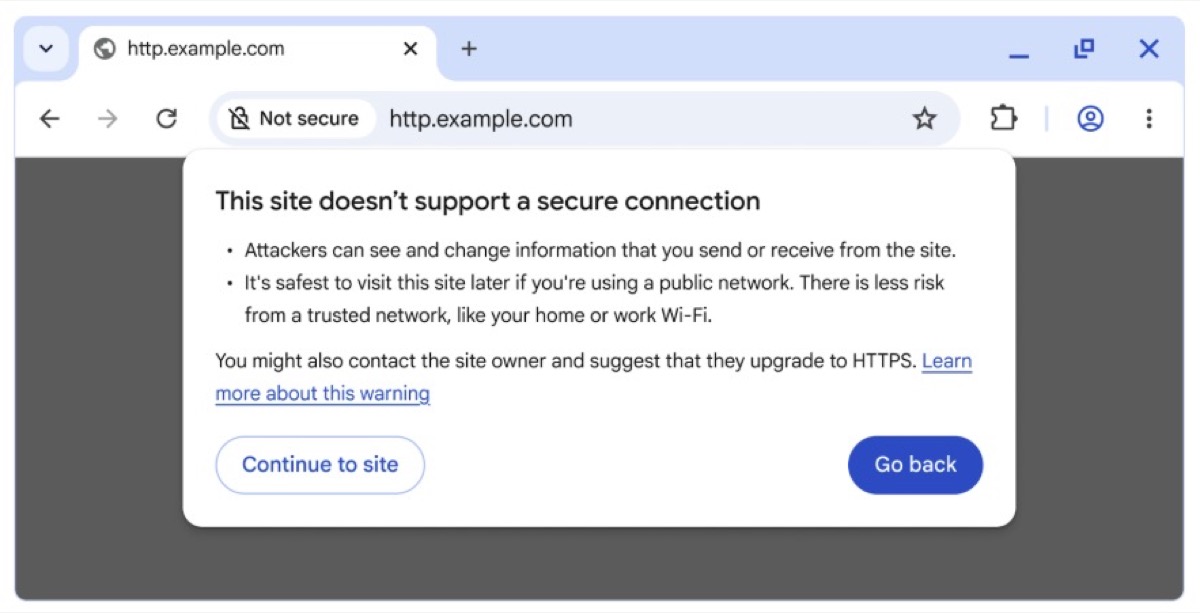
Chrome HTTPS warning dialog saying the site doesn't support a secure connection
Image: Google

Some addresses are exempt, according to Android Authority. Local IP addresses such as a router page at 192.168.0.1 won’t trigger it. Single-label intranet names are excluded too. Google’s 2025 post says the default covers public sites, with private sites available as an optional extra in settings.

Most people should rarely see the prompt. Google’s data, reported by Android Authority, shows nearly 95% of desktop Chrome users see no HTTP warnings in a given week. Fewer than 1% see three or more.

How to turn off Chrome’s HTTPS warnings

An old HTTP site you still rely on can keep triggering the prompt. If that gets in your way, Android Authority gives this path to switch the setting off:

  1. Open Chrome’s Settings.
  2. Go to Privacy and security, then Security.
  3. Turn off Always use secure connections.

Keep in mind that turning it off removes the warning for every site, not just the one causing trouble. Approving the problem site once is usually enough, since Chrome remembers it for as long as you keep visiting. For Chrome’s other safety prompts, see our report on Enhanced Protection’s softer warnings.

Sources: Google Online Security Blog, Android Authority

Related Posts

YouTube red play-button logo, as YouTube adds a pause for hacked channels
Apps

YouTube Will Now Freeze Uploads on Channels It Suspects Are Hacked

October 22, 2026
Waze logo and mascot, the navigation app Malaysia has banned for civil servants
Apps

Malaysia Bans Waze for Civil Servants, Urges Everyone to Switch

October 22, 2026
Google Maps app icon, now with Gemini voice help on Apple CarPlay
Apps

Google Maps on CarPlay Now Lets You Talk to Gemini While Driving

October 22, 2026
Native Spotify app on the Audi MMI center display showing the Your Library screen
Apps

Spotify’s First Native Car App Arrives in Audis, No Phone Needed

October 21, 2026
Gemini Personal Intelligence on Android Auto, Google hero art with example driving prompts
Apps

Gemini Personal Intelligence Reaches Android Auto, Minus the EU and UK

October 21, 2026
Chrome Enhanced Protection suspicious site warning with Mark as safe and Back to safety buttons on desktop and phone
Apps

Chrome Enhanced Protection Adds Softer Warnings for Suspicious Sites

October 21, 2026

Follow Us

  • 914 Followers
No Result
View All Result

Popular

  • One UI 9 on a Samsung Galaxy phone, the Android 17-based update adding a home screen search bar

    One UI 9 Puts a Google Search Bar on the Galaxy Home Screen by Default

    Share
    Share Tweet
  • A Copycat WhatsApp Listing on Google Play Has Passed 500K Downloads

    Share
    Share Tweet
  • Android Phone Number Verification Is On by Default: How to Turn It Off

    Share
    Share Tweet
  • Motorola Signature 27 Update Promise Hedges on Security Patch Timing

    Share
    Share Tweet
  • iOS 27.2 Release Candidate Is Out, but the New Health App Isn’t

    Share
    Share Tweet
  • Samsung Q3 2026 Guidance: Record 107.4 Trillion Won Profit

    Share
    Share Tweet
  • Xiaomi 18 Pro European Prices Leak: From €1,449 With Smaller Batteries

    Share
    Share Tweet

Recent Posts

  • Chrome Starts Warning Everyone Before Opening Non-HTTPS Sites
  • YouTube Will Now Freeze Uploads on Channels It Suspects Are Hacked
  • Malaysia Bans Waze for Civil Servants, Urges Everyone to Switch
  • Oppo Find X10 Reaches Europe With a Smaller Battery Than China’s
  • Apple Pencil Works on iPhone Duo in iOS 27.2 Release Candidate
  • Google Maps on CarPlay Now Lets You Talk to Gemini While Driving
  • Samsung Certified Re-Newed Galaxy Phones Land on Amazon, From $489
AndroidPure

Navigate Site

  • Privacy
  • About Us
  • Tip Us
  • Contact Us

Follow Us

No Result
View All Result
  • Leaks
  • News
  • Reviews
  • Updates
  • How to

This website uses cookies. By continuing to use this website you are giving consent to cookies being used. Visit our Privacy and Cookie Policy.