AndroidPure
  • Leaks
  • News
  • Reviews
  • Updates
  • How to
No Result
View All Result
  • Leaks
  • News
  • Reviews
  • Updates
  • How to
  • Leaks
  • News
  • Reviews
  • Updates
  • How to
No Result
View All Result
AndroidPure
No Result
View All Result

Google Selfie Video Sign-In: Use Your Face to Recover a Locked Account

Androidpure Staff by Androidpure Staff
July 24, 2026
in News

Google is rolling out selfie video as a Google Account recovery option. Announced 23 July 2026, you record a short guided video of your face, then prove it’s you later with a new recording if you lose your phone, password, or usual second factor. It sits alongside passkeys, recovery numbers, and recovery contacts — not a replacement for them.

Google selfie video sign-in: guided head movements for account recovery
Image: Google

How it works

Setup is under Google Account → Security → Selfie video, or go straight to g.co/signin-selfie to check eligibility. In Google’s words, “you just look at your device’s camera and complete a few short, guided head movements to capture multiple angles.” No camera on the machine you’re using? Google hands the flow off via QR code to another device.

When you’re locked out, Google asks for a fresh selfie and matches it to the saved one. The head movements are a liveness check — Google says it will “match your video against your saved selfie and require you to perform simple movements to prove it’s a live video,” aimed at photos and deepfakes. Existing suspicious-sign-in checks still run.

How to set it up

  1. Open g.co/signin-selfie (or Security → Selfie video in your Google Account).
  2. If eligible, follow the on-screen head-movement prompts.
  3. Save the video. Use a new selfie only when recovery asks for it.

It is not universal. Support notes limited regions, accounts, and devices. It is not available for Workspace accounts, supervised (child) accounts, or Advanced Protection Program accounts.

What you’re actually giving Google

Convenience means a biometric face video on Google’s side. Google says it is “encrypted at rest” and used only for sign-in by default. You can delete it in account settings; Google may keep a deleted video briefly for security or policy reasons.

Watch the optional toggle: Google can use your selfie and related data to improve facial recognition, age estimation, and identity tools. That is off unless you turn it on — recovery does not require it. The announcement also never says whether matching runs on-device or on Google’s servers. If you enroll, leave model training off unless you deliberately want that.

This is a Google Account feature, not Android-only. Another recovery path is useful if you’ve been locked out for real — just treat your face as the backup credential it is.

Source: Google

Related Posts

Illustrative photo of two children with a tablet and a kids' smartwatch, accompanying news of Greece's under-15 social media ban
Apps

Greece Bans Social Media for Under-15s From January 2027

October 24, 2026
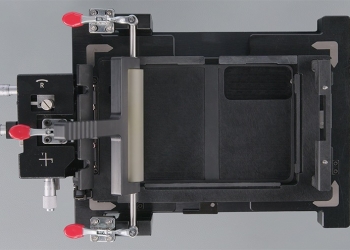
iPhone Duo held open in Apple's inner display fixture with roller bar, red clamps and micrometer knobs
News

Apple’s iPhone Duo Repair Manual Is Out, Including the Inner Display

October 24, 2026
Apple logo for the iOS 27.1 release limited to the iPhone Duo
News

iOS 27.1 Is Out Only for iPhone Duo: Other iPhones Skip to iOS 27.2

October 24, 2026
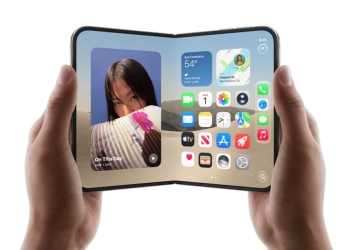
iPhone Duo partly unfolded in two hands, showing the inner screen and hinge
News

Some iPhone Duo Owners Report Inner Screens Breaking at the Hinge

October 24, 2026
Samsung logo for the One UI 9 Verizon update on Galaxy S23, Z Fold5 and Z Flip5
News

One UI 9 Hits Verizon’s Galaxy S23, Z Fold5 and Z Flip5

October 24, 2026
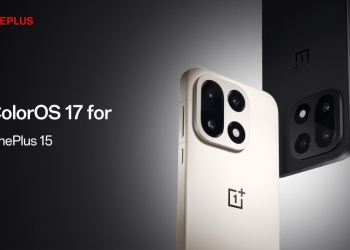
OnePlus banner announcing the ColorOS 17 update for the OnePlus 15, with white and black OnePlus 15 phones
News

OnePlus 15 and Pad 4 Get ColorOS 17 in India Ahead of Schedule

October 23, 2026

Follow Us

  • 914 Followers
No Result
View All Result

Popular

  • One UI 9 on a Samsung Galaxy phone, the Android 17-based update adding a home screen search bar

    One UI 9 Puts a Google Search Bar on the Galaxy Home Screen by Default

    Share
    Share Tweet
  • A Copycat WhatsApp Listing on Google Play Has Passed 500K Downloads

    Share
    Share Tweet
  • Apple Pencil Works on iPhone Duo in iOS 27.2 Release Candidate

    Share
    Share Tweet
  • YouTube Says It Isn’t Hiding the Dislike Button From Viewers

    Share
    Share Tweet
  • YouTube Starts Rolling Out GIF Comments, but Not for Everyone Yet

    Share
    Share Tweet
  • Samsung Q3 2026 Guidance: Record 107.4 Trillion Won Profit

    Share
    Share Tweet
  • iOS 27.2 Release Candidate Is Out, but the New Health App Isn’t

    Share
    Share Tweet

Recent Posts

  • Google Health 5.11 Lets Pixel Watch Auto-Detect Up to 100 Workouts
  • Greece Bans Social Media for Under-15s From January 2027
  • Apple Explores a Better Safari Layout for the iPhone Duo Outer Screen
  • Gemini Turns On Its Notebook Connected App by Default Outside the EEA
  • Apple’s iPhone Duo Repair Manual Is Out, Including the Inner Display
  • Nothing’s Kingdra Teaser May Be the Ear 3 Pro, a Pulled Page Hints
  • Gemini App Can Now Send Interactive Apps to Google Sites in One Tap
AndroidPure

Navigate Site

  • Privacy
  • About Us
  • Tip Us
  • Contact Us

Follow Us

No Result
View All Result
  • Leaks
  • News
  • Reviews
  • Updates
  • How to

This website uses cookies. By continuing to use this website you are giving consent to cookies being used. Visit our Privacy and Cookie Policy.