AndroidPure
  • Leaks
  • News
  • Reviews
  • Updates
  • How to
No Result
View All Result
  • Leaks
  • News
  • Reviews
  • Updates
  • How to
No Result
View All Result
AndroidPure
No Result
View All Result

How to protect WhatsApp with fingerprint lock

Ashwin Karthik by Ashwin Karthik
July 6, 2026
in Guide

Today, we are going to tell you how to protect WhatsApp with fingerprint lock. This can be helpful to protect your privacy, by preventing others from reading your personal chats.

How to protect WhatsApp with fingerprint lock

You don’t need any third-party app or enable an option in your operating system to lock WhatsApp. The chat app has a built-in security feature that you can enable, and the best part is that it works on any Android phone that has a fingerprint sensor.

How to protect WhatsApp with fingerprint lock

1. Open WhatsApp Messenger on your phone.

2. Tap on the three-dot menu to access the app’s settings.

3. Tap on Privacy.

4. Scroll down to the bottom of the page, and tap on Fingerprint Lock.

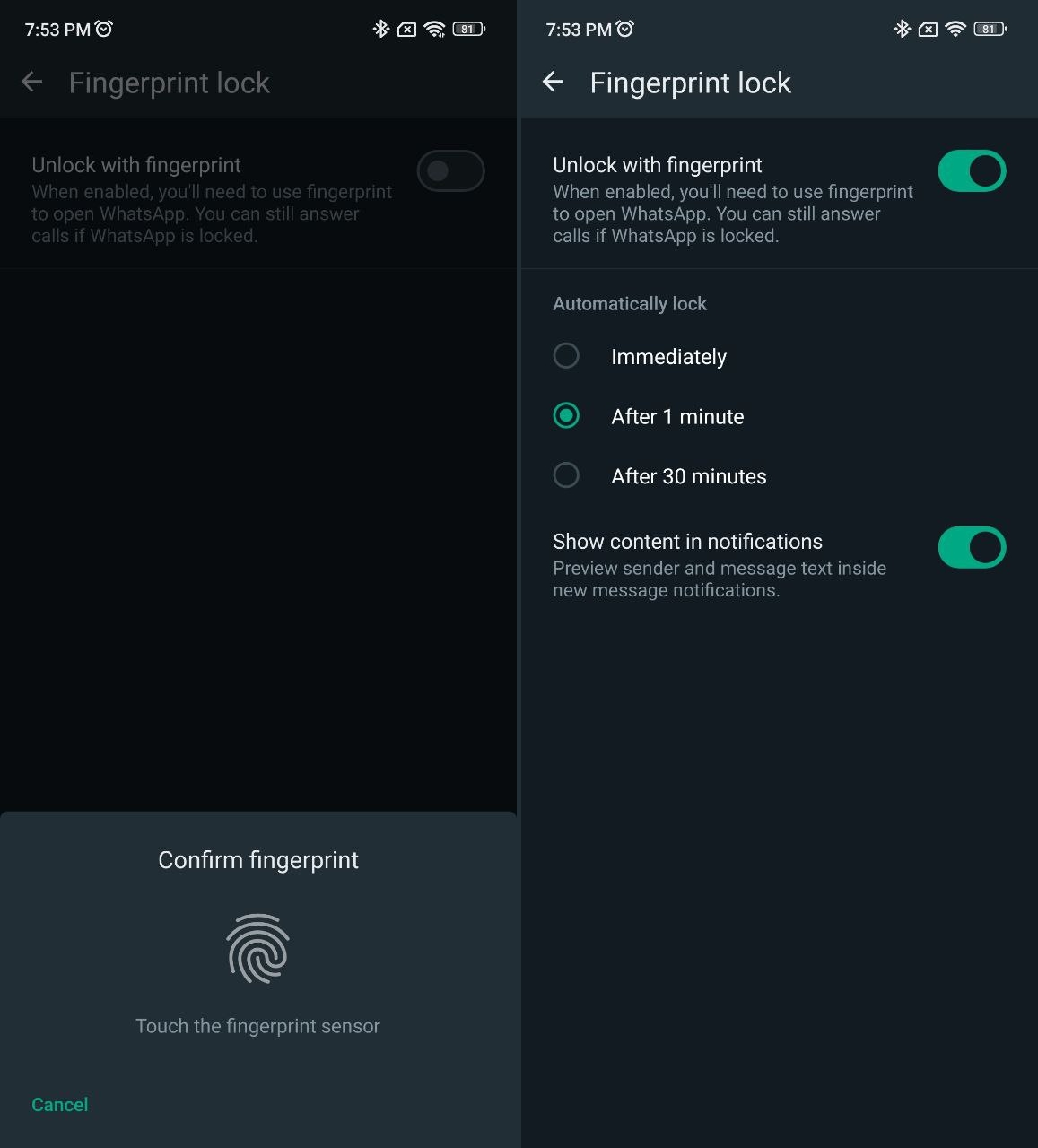
5. This will open a new page with an option that says “Unlock with fingerprint”. Toggle the setting.

6. You will need to place your finger on the fingerprint sensor to confirm the setting.

That’s how to enable fingerprint lock in WhatsApp. You will now need to unlock the app with your fingerprint to access WhatsApp.

One important thing to note here is that this security feature only prevents unauthorized access to your chats. You (and others) will still be able to answer WhatsApp calls even when the app is locked.

The feature has a few extra settings that you can configure. By default, WhatsApp will lock itself after an idle time of 1 minute, i.e. when you have not used the app for 60 seconds. You may set it to lock immediately, or to only lock itself after 30 minutes have passed.
How to enable fingerprint lock in WhatsApp

Even though WhatsApp will require a fingerprint to unlock the chats, all notifications from the app will be displayed normally on your phone. So anyone can view the notifications, including the sender’s name and picture, and the message text from the lock screen, and from the notification panel. This setting is enabled by default, you can turn it off by tapping the toggle next to “Show content in notifications”.

Make sure you have the latest version of WhatsApp from the Google Play Store, installed on your phone to get the newest features.

Do you have a Xiaomi, Redmi or Poco smartphone? You can enable app lock to protect any app in MIUI, find out how to do this.

Tags: How ToTutorialWhatsapp
TweetShareSendShare
Previous Post

How to set up NextDNS on Android

Next Post

How to send an HD photo in WhatsApp

Ashwin Karthik

Ashwin Karthik

Originally a Business Grad, Ashwin is a natural at testing and reviewing apps & games for Windows and Android Apps, as well as flashing ROMs. A proud owner of a Redmi K20, he is also an avid gamer and loves playing on his Computer, PS4 & Nintendo consoles.

Follow Us

  • 914 Followers

Popular

  • Nothing OS 5.0 key art showing the redesigned home screen, widgets and dot-matrix wordmark

    Nothing OS 5.0: Which Phones Get Android 17, and When

    Share
    Share Tweet
  • Android 17’s Motion Assist Reaches Pixels With a Key Overlay Fix

    Share
    Share Tweet
  • iQOO Neo 9 Pro launched in India: Snapdragon 8 Gen 2, Price

    Share
    Share Tweet
  • Pixel 11 Pro XL Scores 168 at DXOMARK, Fifth in the Global Ranking

    Share
    Share Tweet
  • What Is Android Pulse? The Google App With No Icon on 10M+ Phones

    Share
    Share Tweet
  • Galaxy S25 Ultra May Get the S26 Ultra’s Virtual Reflector in One UI 9

    Share
    Share Tweet
  • Vivo T5 Pro Now Costs Rs 12,000 More Than at Launch After a Third Hike

    Share
    Share Tweet

Latest

Illustration of a smartphone representing IDC's 2026 smartphone price and shipment forecast

Smartphone Prices: Average Phone Now Costs $147 More, IDC Says

August 27, 2026
Gemini Live productivity update title card from Google, reading Gemini Live just got a productivity boost

Gemini Live Adds Spark and Daily Brief, Both Behind a Subscription

August 27, 2026
Samsung Galaxy S26 Ultra rear camera module and S Pen in a violet finish

One UI 9 Beta 6 Reaches Galaxy S26 in India as Recruitment Closes

August 27, 2026
Google Play app quality illustration with performance gauges, gears and a rising chart

Android Apps Must Restore Your Login on a New Phone From April 2027

August 27, 2026
Gemini 3.5 Transcribe announcement title card with the Gemini spark logo on a blue gradient

Gemini 3.5 Transcribe Is the Model Behind Gboard’s Rambler

August 27, 2026
Apple September 9 2026 event key art with a glowing Apple logo in blue and pink neon

Apple Sets 9 September Event, With a Foldable iPhone Expected

August 27, 2026
Ring TAKE Throw Away the Key Encryption graphic showing a shield and padlock over a house

Ring Makes TAKE Encryption the Default for Everyone From September

August 27, 2026
AndroidPure

© 2026 AndroidPure - NonStop Android.

Navigate Site

  • Privacy
  • About Us
  • Tip Us
  • Contact Us

Follow Us

No Result
View All Result
  • Leaks
  • News
  • Reviews
  • Updates
  • How to

© 2026 AndroidPure - NonStop Android.