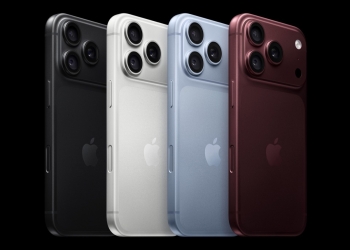
Apple’s iPhone 18 Pro Max ships with a battery that is, on paper, too big to legally ship. Apple has solved that with a firmware trick that limits the battery’s real capacity until you turn the phone on for the first time. The company has now published a support page explaining exactly how the system works and how to use it yourself.

Why the iPhone 18 Pro Max needed a workaround
According to Apple’s own support document, the iPhone 18 Pro Max’s battery capacity has grown to over 20 watt-hours to deliver its longer battery life. That number matters because most countries treat a single-cell battery above 20Wh as subject to extra shipping paperwork and handling rules.
Rather than split the battery into two smaller cells, or sell a reduced-capacity version in some markets, Apple built a software limiter. Apple describes it this way: “iPhone 18 Pro Max uses an innovative battery-firmware solution that limits battery capacity to below 20 Wh from the time it’s manufactured through its transport from the factory. When you activate your iPhone, the limit is removed and the battery’s full charging capacity is available.”
GSMArena, which first flagged the support page, reports the actual rated capacities: 5,567mAh (21.75Wh) for the eSIM-only model sold in the US, and a slightly smaller 5,391mAh (21.06Wh) for the physical-SIM model sold in Europe. Both sit above the 20Wh line once activated, and both ship below it. GSMArena also notes the US transport regulator approved this shipping method back in June 2025. Aviation bodies like IATA and ICAO have not commented publicly on it.
The “Prepare to Ship” setting, for later
The firmware limiter matters most before you ever open the box. But Apple also built a version of it for later in the phone’s life. If you ever need to repair, trade in, return, or hand off an already-activated iPhone 18 Pro Max, a new Prepare to Ship option in Settings puts the battery back under 20Wh before it leaves your hands.
To use it, open Settings, tap General, tap Transfer or Reset iPhone, then tap Prepare to Ship. If you’re sending the phone to Apple, a reseller, or a carrier for repair, trade-in, or return, Apple caps the charge limit at 80 percent for 14 days. That cap applies specifically to that shipping path. If you’re just handing the phone to another person instead, Apple describes no such cap, and you can turn the setting off again whenever you like.
Discharging from a full charge can take up to a couple of hours, and the phone may run warmer than usual while it does. Once it’s done, Settings shows “Ready to Ship” with a red badge. If you’ve already erased the phone, the same status appears on the Hello screen. None of this is a safety measure for everyday use, either. Apple’s page notes the battery is safe for normal shipping and air travel, and that the process exists purely to satisfy paperwork requirements, not to protect you while traveling with the phone.
What this means for buyers
If you bought the phone new and haven’t taken it out of the box or activated it, you don’t need to do anything. Apple’s software already keeps the battery under 20Wh until you set it up. The setting only becomes relevant later, when you’re shipping the phone somewhere after it’s already been in use — see our coverage of Apple’s iPhone 18 Pro battery replacement fee for what a repair shipment like that can cost.
It’s also worth knowing that the US and European versions of the same phone don’t ship with identical battery capacity. GSMArena’s numbers put the European, physical-SIM model at a slightly smaller cell than the US eSIM-only version. That’s a small but real difference for anyone comparing specs across regions, and it comes from Apple fitting in a SIM tray on the European unit, not from a deliberate downgrade.
Source: Apple Support, GSMArena