


Android latest offering for smartphone comes as Android 4.0 code name Ice Cream Sandwich ICS is offered on the new smartphones by different manufacturers. Old device owners need to wait for their Phone manufacturers to release a update for their phones which usually takes lot of time. Sometime it can be months or even a year before a new major update to Android OS for most smartphone arrives.
SUMMARY
Also, Not every phone can be upgraded to Ice cream sandwich. Most old devices wont be getting a upgrade to ICS anytime in future as manufacturers have declined to support that citing reasons like low spec hardware on these phones. But thanks to open source developers, hackers etc, its possible to have ICS on old devices too.
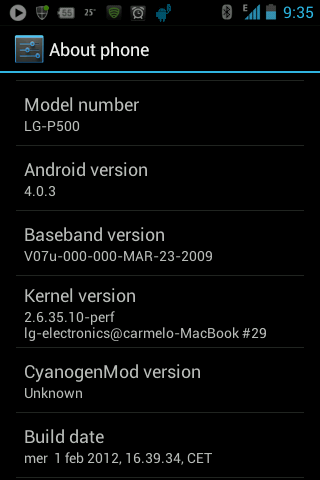
Today we will talk about one such device LG P500 which will not get a ICS upgrade officially, but a ICS port of CyanogenMod 9 by lupohirp is available at XDA forums and can be installed on LG P500 smartphone.

Checkout the updated post with latest ICS ROM with Working Camera here.
What Doesn’t Work
This ROM is still in beta and hence you can encounter bugs, not to stable performance and unknown hiccups too. Lets talk about what doesn’t Works in this ROM:
- Camera.
- Some Paid Apps.
As said above, Camera doesn’t work after you successfully flash this ROM on your Phone. So if you use your phone Camera often you should stay away from this ICS port ROM. Also, Keep in mind that this ROM is only for new basebands and if you are on old baseband, then you must flash your phone to new baseband to make Data and GSM to work.
We will talk about how to distinguish if you are on old or new baseband. We will also talk about how to flash your phone to new baseband.
For anyone who wish to give it a try must remember that doing it incorrectly may brick your Phone and convert into a paper weight. So read everything carefully before flashing this ROM on your phone.
Install Ice Cream Sandwich ICS ROM on LG P500
I will keep updating this post. You must download the ROM files from the latest update.
Update 5: Another KANG build is released and ROM is almost stable. Everything works almost except the Camera preview and few other hiccups like FC (Force close) crashes with Gallery etc.
Download ROM & Gapps:
1) CM9-P500-PASQUALE-KANG(TESTING VERSION)(03/04/2012)
2) Gapps-ICS-20120224-signed.zip
3) CM9-P500-PASQUALE-KANG(21/03/2012)
Update 4: KANG TEST BUILD is being uploaded at the XDA Thread and it comes with the following fixes:
- Based on pure CM-Patches
- Browser Rendering/ Crash Fixed
- Enabled EXT Partition Support in kernel
- Data Counter/ Usage Fixed
- Applications Space Fixed (200MB Available)
- Video Lags In Youtube Fixed (HQ videos still lag)
You can download the cm-p500-pasquale-KANG.zip from the mediafire link posted in the XDA thread.
Update 3: Another update is available now and Camera works with this update. You can download Beta4cam.zip from the XDA Thread and flash it. The camera works well, with effects and everything but no preview.
Update2: Beta 4 has been released, but no changelog has been provided. You can download BETA4-TESTING.ZIP from the link provided at the XDA Thread.
Download the ROM zip file beta_testing.zip (91.2 MB) from here. You will need the Google Apps file too after flashing the ROM. You can get Gapps V7.1 (FOR ICS 4.0.3)here.
I have installed it on my Phone and everything works great except the Camera. :)
Update1: They have released a third beta of the ROM with Full Hardware Acceleration.
BETA3
- Full OPENGL rendering
- Mic fixed
- Enabled Genlock support in kernel for camera
- CPU set on boot fixed
Put the files on your SD Card’s main folder for easy navigation since the recovery mode is tough to navigate with hard keys.
- Your phone must be rooted and you must have ClockworkMod installed on your smartphone to boot your phone into your recovery Mode.
- After you boot in recovery mode, use your Volume key at right side of phone to scroll up and down. You need to clear few settings before you can flash to your phone to the new ROM.
- Clear user Data/factory reset>> Clear/wipe Cache >> clear Dalvik Cache. Dalvik cache option comes under advance options in recovery mode.
- After this choose install zip from sdcard option.
- Select the ROM (the same file that you just downloaded, beta_testing.zip) to install – your ROM will begin to install.
- Once installed press the back button few times to go back to the main screen of Clockwork Recovery.Choose reboot system now.

After the install is done, you must reboot the phone and then install the Gapps applications again by booting into Recovery mode by the same method as described above for flashing the ROM.
Random Offset Error
During the flashing of ICS ROM, you may get a “Random offset xxxx” error. You should not worry about it. This is not an error message at all, but a safety feature implemented in ICS. More details here.

No GSM Network
After flashing the ICS ROM if your phone is unable to connect your GSM Network, this means that your phone was on Old baseband and you must flash it to new baseband.
- P500-v20G-baseband.7z (New Baseband) is for official v20[abdg…] ROMs and ROMs based upon it (e.g., GingerLOL, v20G stock ROM, customized v20G ROM, 0x0v3rfl0w ROM and GingerCriccoROM).
- P500-v10E-baseband.7z (Old Baseband) is for all other ROMs.
Details about how to flash your phone to new baseband are detailed here.
If the problem of no network continued even after flashing to new baseband, then you should go to your Mobile Network settings and select “use only 2G Network” there. It will solve the issue for sure provided you are on new baseband.
Flash to new Kernel for better stability
The kernel with the ROM is a bit unstable and you can flash to a new kernel for a better stablity of the ICS ROM. At the moment I am using the Franco Kernel and for me its almost stable now. You can get the Franco Kernel here.
PS: Special thanks to Ashwin who helped me during this install with all the links and shared his knowledge. Screenshots used here too are taken using his phone.


