AndroidPure
  • Leaks
  • News
  • Reviews
  • Updates
  • How to
No Result
View All Result
  • Leaks
  • News
  • Reviews
  • Updates
  • How to
  • Leaks
  • News
  • Reviews
  • Updates
  • How to
No Result
View All Result
AndroidPure
No Result
View All Result

iOS 27.3 Will Let Apple Check Public iCloud Links for Harmful Content

News Desk by News Desk
November 5, 2026
in Apps, News

From iOS 27.3, Apple will check anything you share from iCloud with the Anyone with the Link option for harmful content. The change also covers iPadOS, macOS and visionOS 27.3 or later. Apple says it can remove flagged content and disable the Apple Account behind it. If it decides it’s necessary, it can also involve law enforcement.

Grey Apple logo on a white background, for the iCloud Anyone with the Link change in iOS 27.3
Image: Apple

The policy comes from a new Apple support document dated November 3. iOS 27.3 is still in beta, so nothing changes for most iPhone owners today. Once the update ships, public iCloud links created on it fall under the new rule.

What Apple says it will check in iCloud links

Apple’s support page sets out the change in a single sentence:

When you share an item that can be accessed by Anyone with the Link in version 27.3 or later of iOS, iPadOS, macOS, and visionOS, that content is made accessible to Apple to check for harmful content.

Apple’s examples are everyday ones: a photo in iCloud Photos or a file in iCloud Drive. If something is flagged, the page says Apple can move, modify or delete it at any time. Apple may also block or disable the account. It can even stop you creating a new account with the same email address or phone number.

The page doesn’t say what counts as harmful content. It also doesn’t describe how a flag gets reviewed, or how you would appeal a disabled account. That is a lot of power tied to an undefined term. The penalty lands on the same account that holds your iCloud Photos and iCloud Drive.

Is this an encryption change?

Not really. Public links already sat outside Apple’s strongest protection. Apple’s Advanced Data Protection page lists sharing with anyone who has the link as a feature that doesn’t support it. To make web sharing work, the encryption keys for those items are uploaded to Apple.

The new document repeats that point. A shared item is no longer end-to-end encrypted, even if you or other participants have turned on Advanced Data Protection. What’s new in 27.3 is that Apple will actively check that content.

How to share privately instead

Apple’s page describes two kinds of link under Share a Link, plus a third route that skips public links:

  • People you choose: only people you invite or approve can open the item. Apple’s page doesn’t describe these links as checked.
  • Anyone with the link: anyone holding the link can open the item, and Apple says that includes Apple. This is the option that gets checked from 27.3.
  • Send a Copy: shares a copy of the item rather than a public link to it.

For anything personal, pick People you choose or Send a Copy. That covers things like ID scans, medical files and family photos. Save Anyone with the Link for things you’d be fine with a stranger opening, or Apple. Apple also notes that not every feature is available in every country or region.

Source: Apple Support, Apple Support (Advanced Data Protection), via 9to5Mac

This post was written with AI assistance from public sources and published under the editorial responsibility of AndroidPure’s editor. How we work.

Related Posts

Nothing teaser showing the dark rounded corner of an unidentified black object on a grey gradient, with COMING SOON text
News

Nothing’s First AI-Native Product Ships in December, Carl Pei Says

November 5, 2026
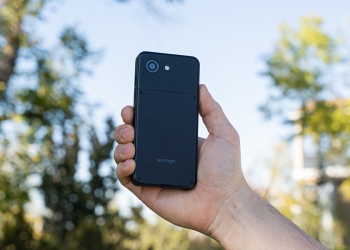
Hand holding the black enough phone prototype against trees and sky, showing the back with its single camera and four screws
News

The 5.3-Inch enough phone Hits Kickstarter From $399, Targets May 2027

November 5, 2026
Qualcomm and Starlink wordmarks over a night valley under a starry sky, marking the Starlink Mobile 5G deal
News

SpaceX Picks Qualcomm for Starlink Mobile’s 5G Network, Starting 2027

November 5, 2026
iPhone 18 Pro in four colors seen from the back, showing the triple-camera plateau
News

iPhone 18 Pro Storage: Apple Charges About 3x Its Cost, WSJ Estimates

November 4, 2026
Google Photos Memories collage of travel photos above the app's bottom bar with the Memories tab highlighted
Apps

Google Photos Memories: How to Turn Off the Added Background Music

November 4, 2026
YouTube logo, red play button on a white background
Apps

YouTube May Be Building a Social App Called Tamba, Code Shows

November 4, 2026

Follow Us

  • 914 Followers
No Result
View All Result

Popular

  • Google Play logo, the store where hidden nudify apps were found

    Hundreds of AI Apps on Google Play and App Store Hid Nudify Tools

    Share
    Share Tweet
  • One UI 9 Puts a Google Search Bar on the Galaxy Home Screen by Default

    Share
    Share Tweet
  • A Copycat WhatsApp Listing on Google Play Has Passed 500K Downloads

    Share
    Share Tweet
  • Nothing OS 5.0 Stable Reaches Phone (3a), 3a Pro, 4a and 4a Pro

    Share
    Share Tweet
  • Galaxy Fit 4 Support Pages Go Live in India and UK Ahead of Launch

    Share
    Share Tweet
  • Jio Voice-Only Plans Start at ₹147, but 28-Day Pack Saves Just ₹12

    Share
    Share Tweet
  • Xiaomi’s HyperOS 4 Global Rollout: All 82 Eligible Phones and Tablets

    Share
    Share Tweet

Recent Posts

  • Nothing’s First AI-Native Product Ships in December, Carl Pei Says
  • The 5.3-Inch enough phone Hits Kickstarter From $399, Targets May 2027
  • Apple Watch Ultra 3 Drops to $549 at Best Buy, $250 Off
  • Galaxy A26, A27 and A54 Get Stable One UI 9 in the US
  • SpaceX Picks Qualcomm for Starlink Mobile’s 5G Network, Starting 2027
  • iOS 27.3 Will Let Apple Check Public iCloud Links for Harmful Content
  • One UI 9.5 Beta Build for Galaxy S26 Ultra Spotted on Samsung Servers
AndroidPure

Navigate Site

  • Privacy
  • About Us
  • Tip Us
  • Contact Us

Follow Us

No Result
View All Result
  • Leaks
  • News
  • Reviews
  • Updates
  • How to

This website uses cookies. By continuing to use this website you are giving consent to cookies being used. Visit our Privacy and Cookie Policy.